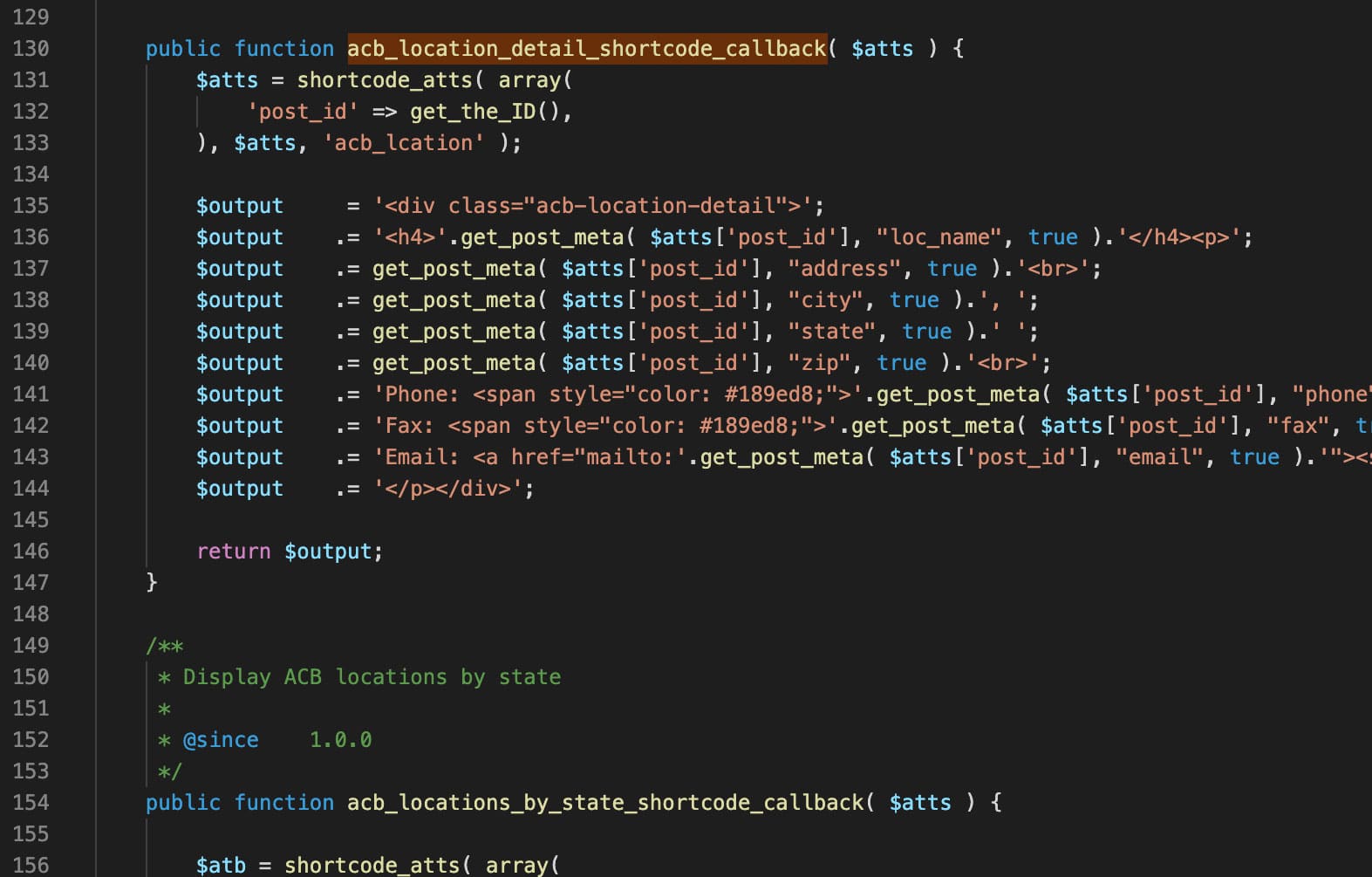
Function location: /wp-content/plugins/acb-locations/public/class-acb-locations-public.php at line number 130
Description:
This shortcode is responsible to display the location information for a single location.
Output:
Usage:
Put acb_lcationinside brackets [].
[ acb_zip_search ]
Function location: /wp-content/plugins/acb-locations/public/class-acb-locations-public.php at line number 335
Description:
This shortcode is responsible to display the zip search form.
Output:
Usage:
Put acb_zip_searchinside brackets [].
[ acb_zip_search_result ]
Function location: /wp-content/plugins/acb-locations/public/class-acb-locations-public.php at line number 359
Description:
This shortcode is responsible to display the zip search results.
Output:
Usage:
Put acb_zip_search_resultinside brackets [].
[ acb_location_social ]
Function location: /wp-content/plugins/acb-locations/public/class-acb-locations-public.php at line number 311
Description:
This shortcode is responsible to display the socials icons for a single location.
Output:
Usage:
Put acb_location_socialinside brackets [].
[ acb_lcations state="state_initial" ]
Function location: /wp-content/plugins/acb-locations/public/class-acb-locations-public.php at line number 154
Description:
This shortcode is responsible to display the locations for a single state.
Output:
Usage:
Put acb_lcations state=”state_initial”inside brackets [] and use the two letter state initial from dashboard by replacing “state_initial“
[ acb_lcations_filter ]
Function location: /wp-content/plugins/acb-locations/public/class-acb-locations-public.php at line number 212
Description:
This shortcode is responsible to display the locations with filter. If you add a new state in the dashboard it will show up here.
Output:
Usage:
Put acb_lcations_filter inside brackets [] and use the two letter state initial from dashboard by replacing “state_initial“
REERS
[ acb_career_filter ]
Function location: /wp-content/plugins/acb-careers/public/class-acb-careers-public.php at line number 248
Description:
This shortcode is responsible to display the career filter form with both department and discipline filtering options and can filter jobs for all departments and disciplines.
Function location: /wp-content/plugins/acb-careers/public/class-acb-careers-public.php at line number 384
Description:
This shortcode is responsible to display the career filter form with discipline filtering option and can filter jobs for a single department.
Output:
Usage:
Put acb_career_filter_by_department department=”department_slug”inside brackets [] and use the department slug from dashboard by replacing “department_slug“
[ acb_career_filter_result ]
Function location: /wp-content/plugins/acb-careers/public/class-acb-careers-public.php at line number 177
Description:
This shortcode is responsible to display the career filter search results for all departments.
Function location: /wp-content/plugins/acb-careers/public/class-acb-careers-public.php at line number 956
Description:
This shortcode is responsible to display the career search form for a single departments.
Output:
Usage:
Put acb_career_search_form_department department=”department_name” inside brackets [] and use the department name from dashboard by replacing “department_name“
[ acb_career_search_result ]
Function location: /wp-content/plugins/acb-careers/public/class-acb-careers-public.php at line number 1138
Description:
This shortcode is responsible to display the career search form results for both a single and all departments.
Output:
Usage:
Put acb_career_search_result inside brackets []
[ acb_city_job_list city="city name" ]
Function location: /wp-content/plugins/acb-careers/public/class-acb-careers-public.php at line number 741
Description:
This shortcode is responsible to display the career job list for a single city.
Output:
Usage:
Put acb_city_job_list city=”city_name” inside brackets [] and use the exact city name from dashboard career job by replacing “city_name.“
[ acb_state_job_list state="state_name" ]
Function location: /wp-content/plugins/acb-careers/public/class-acb-careers-public.php at line number 782
Description:
This shortcode is responsible to display the career job list for a single state.
Output:
Usage:
Put acb_state_job_list state=”state_name” inside brackets [] and use the exact state name from dashboard career job by replacing “state_name.“
[ acb_job_details ]
Function location: /wp-content/plugins/acb-careers/public/class-acb-careers-public.php at line number 823
Description:
This shortcode is responsible to display the single job details.
Function location: /wp-content/plugins/acb-workshops/public/class-acb-workshops-public.php at line number 189
Description:
This shortcode is responsible to display the workshops for a single department by using department id.
Output:
Usage:
Put acb_workshops_grid_list department=”department_id” inside brackets [] and use the department_id from dashboard workshop->department by replacing “department_id.“
Current department id for Clinical is 47 and for Parents is 48.
[ acb_workshops_grid_list_all ]
Function location: /wp-content/plugins/acb-workshops/public/class-acb-workshops-public.php at line number 127
Description:
This shortcode is responsible to display the workshops of all types.
Output:
Usage:
Put acb_workshops_grid_list_all inside brackets []
[ acb_workshops_grid_three ]
Function location: /wp-content/plugins/acb-workshops/public/class-acb-workshops-public.php at line number 269
Description:
This shortcode is responsible to display three most recent workshops of all types. It is being used in homepage.
Output:
Usage:
Put acb_workshops_grid_three inside brackets []
[ acb_workshop_details ]
Function location: /wp-content/plugins/acb-workshops/public/class-acb-workshops-public.php at line number 332
Description:
This shortcode is responsible to display the workshop details in a single workshop page.
Output:
Usage:
Put acb_workshop_details inside brackets []
[ acb_workshop_credit ]
Function location: /wp-content/plugins/acb-workshops/public/class-acb-workshops-public.php at line number 378
Description:
This shortcode is responsible to display the workshop credit field value in a single workshop page.
Output:
Usage:
Put acb_workshop_credit inside brackets []
[ acb_workshop_registration_link ]
Function location: /wp-content/plugins/acb-workshops/public/class-acb-workshops-public.php at line number 359
Description:
This shortcode is responsible to display the workshop registration link button in a single workshop page.
Output:
Usage:
Put acb_workshop_registration_link inside brackets []
VIDEOS
[ acb_videos_grid_type type="type_id" ]
Function location: /wp-content/plugins/acb-videos/public/public/class-acb-videos-public.php at line number 167
Description:
This shortcode is responsible to display the list of videos based on a parent category ID. If you want to get the parent category ID please go here and hover the Edit link and pay attention to the link. You should see “tag_ID=64” and 64 is the ID you need.
The filter buttons will be derived from the child types/category.
Output:
Usage:
Put acb_videos_grid_type type=”type_id” inside brackets [] and use the parent type_id from Videos workshop->Type by replacing “type_id.“
[ acb_youtube_video ]
Function location: /wp-content/plugins/acb-videos/public/public/class-acb-videos-public.php at line number 242
Description:
This shortcode is responsible to display the youtube video from the dashboard for a single video post.